Blog · templates · story setup · writing craft
Starting From a Template Without Writing a Template Story
JP LeBlanc · · 5 min read
Pick the Romantasy template in AIStoryHub and before you've typed a word, your story already has a genre (Fantasy), a point of view (first person), a tense (past), a time period (medieval), a mood (romantic), a tone (dramatic), a working title ("Untitled Romantasy"), and a one-line description: "A dangerous world of magic where the deadliest risk is falling in love." It also has four files waiting for you: a Protagonist, a Love Interest, a Magic System & World entry, and a chapter outline called "Chapter 1: The Threshold."
That's a lot of decisions made for you, which is the point of a template, and also the risk. Every one of those defaults is the most typical choice for the genre. Accept all of them and fill in the blanks with the first idea that comes to mind, and you get the most typical book in the genre, which is the book readers have already read.
Here's how I'd use one to get started faster without ending up there.
What a template actually gives you
There are fifteen genre templates on the Templates page, plus a "Start from scratch" option in the New Story dialog. Romance and fantasy lead the list, in an order based on what's selling and what serial readers want right now: Romantasy, Contemporary Romance, Dark Romance, Romantic Suspense, Epic Fantasy, Young Adult Fantasy, Cozy Fantasy, LitRPG / Progression Fantasy, Urban Fantasy / Paranormal, Psychological Thriller, Mystery Whodunit, Cozy Mystery, Historical Romance, Space Opera, and Horror.
Each one does two things. It pre-fills the story settings (genre, tense, POV, mood, tone, time period, language, title, description), and it creates a few starter files. The starter files are mostly bracketed prompts. A character file looks like this:
Physical Description: [Appearance; any magic marks, powers, or scars.]
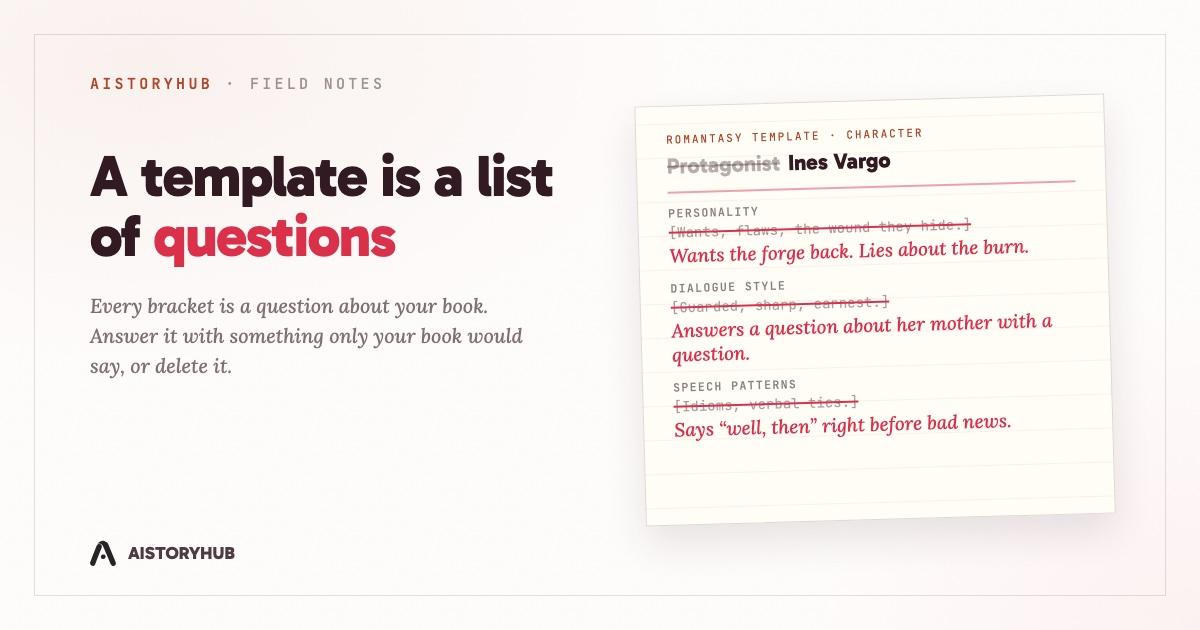
Personality: [Wants, flaws, the wound they hide.]
Background: [Ordinary world before the story; source of their power or lack of it.]
Dialogue Style: [Guarded, sharp, earnest.]
Speech Patterns: [Idioms, verbal tics.]
Chapter outlines follow one shape across every template: Hook, Goal/Conflict, Obstacle/Complication, Turn/Shift, Cliff/Resolution. Some templates add a world file that fits the genre. Mystery Whodunit starts you with an event called "The Crime" (what happened, when and where, how it was discovered, the initial clues). Horror gives you a location called "The Place," with prompts for atmosphere, history, and sensory details.
Nothing is locked. Choosing a template in the New Story dialog just fills in the form, and anything you change before you click create overrides what the template set.
Change one default on purpose
Before you create the story, look at the settings the template picked and change at least one of them deliberately.
Horror defaults to first person, past tense, contemporary, serious. That's a reasonable center for the genre, which is exactly why it's worth questioning. Third person limited puts a little distance between the reader and the narrator's fear, which can make the dread feel more like something watching than something felt. A historical setting takes away the phone, the flashlight app, and the 911 call, which removes half of the problems a modern horror plot has to explain away.
Romantasy defaults to medieval. Romantasy doesn't need a medieval setting. A magic system wrapped around an industrial city, or a court that runs on something other than swords, would be a different book from page one.
Don't change things just to be different. Change the one setting you have an actual opinion about. If you don't have one yet, that's information too: you may not know the book well enough to start drafting, and the next section will help with that.
Fill the brackets with specifics, or delete them
The bracketed text in a starter file is literal text. If you leave [Wants, flaws, the wound they hide.] sitting in your protagonist's file, it stays there. When you open Ash, the story chat reads your whole project as its briefing, character files included, along with a story overview built from the genre, POV, tone, and whatever description you kept or rewrote.
A half-filled template is worse than a short one. If you don't know your love interest's speech patterns yet, delete that line instead of leaving the placeholder or writing "witty." When you do fill a bracket, aim for the detail only your book would have. "Guarded" describes half the characters in the genre. "Answers questions with a question when the subject is her mother" describes one.
Do the same with the description. "A dangerous world of magic where the deadliest risk is falling in love" works as a placeholder because it would fit thousands of books, and that's also why you should replace it. Write the one sentence that only fits yours, even if it's awkward. You can make it sound good later.
Rename the starter files
The starter characters have job titles: Protagonist, Love Interest, Detective / Sleuth, Lead 1, Lead 2. Rename them as soon as you know who they are. A file called "Love Interest" invites you to think of that person as a role, and roles make for stock dialogue.
When you pick names, be aware that models lean on the same small set. Our AI cliché corpus has a whole category for this, and "Elara" is a red-tier tell. If a model suggested the name, check it against the Slop Checker before you get attached. Names are the easy part, though. Giving each character a voice of their own is harder, and that's the subject of why every AI character talks the same.
Treat the outline as questions
The Epic Fantasy template creates three outline files called Ordinary World, Call to Adventure, and Trials and Allies. That's the hero's journey, and the template's own description says so. It's a fine skeleton. It's also the skeleton under a great many fantasy novels, and following it beat by beat is how you get a book that feels familiar in the wrong way.
Read each outline field as a question about your story. "Turn/Shift: Crossing the threshold into the special world" asks what your protagonist crosses into, and whether that crossing is a choice or an accident. Maybe your book has no ordinary world at all and opens mid-ordeal. Then delete that file. Keeping a beat you don't believe in, because the template provided it, is how a template story happens.
The Hook to Cliff/Resolution shape is the most useful part of the outline files, and you can apply it to every chapter you write, including ones the template never imagined.
When to skip templates entirely
If you already have a story bible somewhere, a template mostly gets in the way. Start from scratch and build your own entries. If you're writing in a genre the list doesn't cover, pick the nearest template only if its settings are mostly right, then delete what isn't. And if you're sitting on a world you plan to use across several books, a Universe will serve you better than any single-story template; there's a walkthrough in book three shouldn't have to relearn book one's canon.
If you want to try one: open /templates, pick the genre you'd write anyway, and before clicking create, change one setting and rewrite the description in your own words. Then go through the starter files and either fill each bracket with something specific or delete it. That takes about twenty minutes, and it saves you from noticing in chapter ten that you've been writing the genre's average book.